Best Smartwatch to Give Someone Who Has Never Worn One
The usual winners are the worst first smartwatches. Here is why, and what to buy instead.
The short answer is the Amazfit Bip 6 for most people, or the Apple Watch SE if the recipient has an iPhone and you know they want one. Those two answers come from opposite directions, and which applies to you depends almost entirely on one thing: whether you are giving a wearable to somebody who asked for one, or giving it to somebody who did not.
That distinction matters because a first smartwatch fails in predictable ways, and almost none of them are about the quality of the device. The abandoned smartwatch in somebody's bedside drawer is very rarely a bad product. It is usually an excellent product that asked more of its owner than they were willing to give: a nightly charge, an account, an app, a stream of notifications they did not want, and a daily readout about their own body that they found more annoying than interesting. Every one of those is a habit problem rather than a hardware problem, and the ordinary way smartwatches get reviewed — by people who love wearing them — does not surface any of it.
So this page is organized around the decision rather than around the products. There are four questions to answer before you spend anything, a plain account of the three ways a first wearable gets abandoned, and then four picks, each matched to a specific answer to those questions. If the answers point at a plain analog watch instead, we will say so — that is a legitimate outcome of this page and happens more often than you would think.
How this page is funded: if you buy through a link here we may earn a commission, at no extra cost to you. It never decides what makes a list or what order the picks are in. Full disclosure.
Quick picks
The whole list at a glance. Tap any row to jump to the full write-up further down the page, or go straight to the listing.
| # | Product | Best for | Price |
|---|---|---|---|
| 1 | 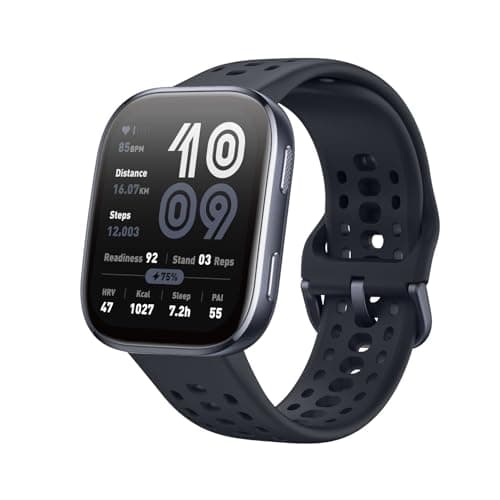 Amazfit Bip 6Fourteen-day rating, big readable screen, works with any phoneUnder $100 | Best first smartwatch for most people | $79.00 View on Amazon #ad How this is funded · Price as of November 21, 2026 |
| 2 | 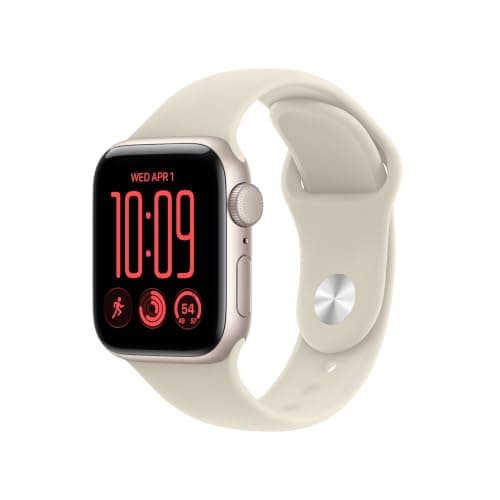 Apple Watch SEThe default, and the easiest to learn if they live inside an iPhoneUnder $250 | Best first smartwatch for a committed iPhone user | $199.00$249.00−20% View on Amazon #ad How this is funded · Price as of November 21, 2026 |
| 3 | 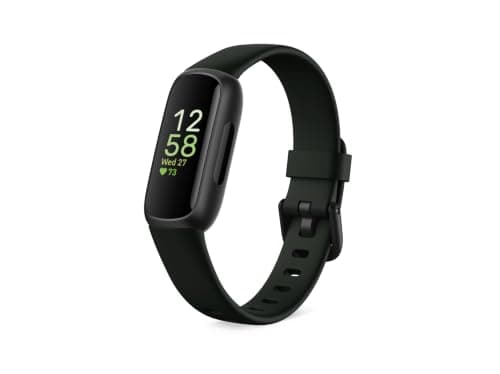 Fitbit Inspire 3Slim band, rated ten days, easy to forget you are wearing itUnder $100 | Best for somebody who says they do not like watches | |
| 4 | 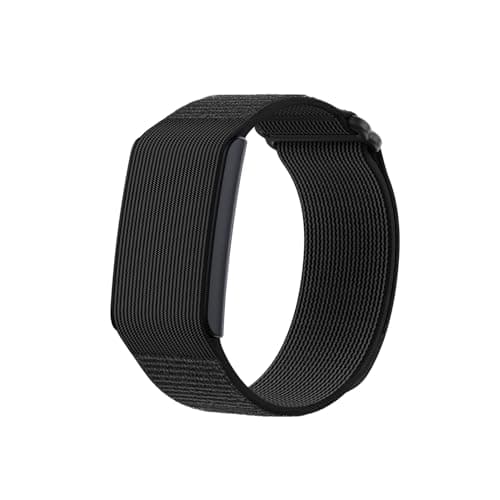 Amazfit Helio StrapNo display whatsoever — a sleep and recovery sensor, not a watchUnder $100 | Best if they do not want a screen at all | $99.00 View on Amazon #ad How this is funded · Price as of November 21, 2026 |
We have not handled these products. Nobody here has worn, tested or owned them, and we will not pretend otherwise. What we do is check that each pick is still sold, still holds up and still makes sense as a gift at this budget. How we choose.
What to buy, if you have decided
Amazfit Bip 6
Amazfit
A budget smartwatch with a large bright screen, built-in GPS with offline maps, and a battery Amazfit rates at up to fourteen days. No subscription is needed to see your own data.
The pick when you want the lowest possible chance of the thing ending up in a drawer. Three reasons, all of them about the beginner rather than the spec sheet. First, Amazfit rates it at up to fourteen days per charge, which means a first-time wearer never has to build the nightly-charging habit that kills most first smartwatches — the single biggest cause of abandonment simply does not apply. Second, the 1.97-inch AMOLED is the biggest screen at this money, so a beginner is not squinting at a tiny readout or learning gestures to see the time; it works like a watch on day one. Third, it pairs with both iPhone and Android, so there is no compatibility question to get wrong, and it has built-in GPS with offline maps. The health data is not paywalled, so nobody gets a surprise bill. The honest cons. The app ecosystem is thin next to Apple's or Google's — beyond health, notifications and timers it does little, which is a limitation for an enthusiast and arguably a feature for a beginner. The build is plastic and feels like the price. And a screen that large looks large on a small wrist and under a formal cuff.
What is good
- Nearly two weeks of rated battery life, which is the most forgiving feature a gift smartwatch can have
- The biggest screen of anything at this money, so it reads at a glance without reading glasses
- Works with iPhone and Android, and the health data is not paywalled
What to know
- The app ecosystem is thin next to Apple or Google, so it does little beyond health, notifications and timers
- The build is plastic and feels like the price, which matters for something unwrapped in front of people
- A screen that large on a small wrist looks exactly like a screen that large on a small wrist
#ad How this is funded · Price as of November 21, 2026
Apple Watch SE
Apple
Apple's entry smartwatch: notifications, workouts, heart rate, fall detection and Apple Pay, paired to an iPhone.
The pick when the recipient has an iPhone, has shown some interest in getting a smartwatch, and you want them to have the real thing rather than an approximation. Apple's entry model does notifications, workouts, heart rate, fall detection and Apple Pay, and the reason it works for a beginner is familiarity rather than capability: somebody who already lives inside an iPhone finds the interface, the settings and the app already familiar, which removes most of the learning curve that makes a first wearable frustrating. Fall detection and emergency calling are also a genuine argument for giving one to an older relative who has never worn a watch of any kind. Two cons, and they are both about habits rather than hardware. It requires an iPhone — on Android it is useless, so confirm the phone first. And it charges nightly, which is exactly the habit a first-time wearer has not built; if the recipient is not already the sort of person who plugs devices in without being reminded, this is the most likely pick on this page to be abandoned by February, excellent though it is.
What is good
- Genuinely useful every day, which almost nothing else at this money can claim
- Fall detection and emergency calling matter for an older recipient
- The default gift for a teenager who already lives inside an iPhone
What to know
- Requires an iPhone, so it is useless to an Android user
- Charges nightly, which some people never adapt to
#ad How this is funded · Price as of November 21, 2026
Fitbit Inspire 3
Fitbit
A slim fitness band that tracks steps, heart rate and sleep stages, rated by Fitbit at up to ten days per charge. It borrows the phone's GPS rather than carrying its own.
The pick when the recipient has said, in some form, that they do not like wearing things on their wrist. The Inspire 3 is a narrow band rather than a watch: light enough that people who claim to hate watches stop noticing it within a day, rated by Fitbit at up to ten days per charge, and focused on the two things a beginner actually looks at — steps and sleep stages. It is the gentlest possible introduction to a wearable, because it does not look like a device, does not demand interaction, and does not need charging on a schedule anybody has to remember. It is also the cheapest pick here, which makes it the low-risk option when you are genuinely unsure whether a wearable will land at all. The cons. Connected GPS only, so a walk logs duration and heart rate but not a route or a GPS pace. No ECG sensor. Setup needs a phone app and a Google account, which is the one real friction point — a beginner may need help with the first fifteen minutes. And the hardware dates from 2022 and is overdue a replacement, so a newer model may appear during its life.
What is good
- The longest rated battery life in the Fitbit range, so it can be worn through the night without a nightly charge
- Light and narrow enough that somebody who has never worn a watch forgets it is on
- Sleep stages are the headline feature, which is the one number an exhausted recipient actually looks at
What to know
- Connected GPS only: it records duration and heart rate but not a route or a GPS pace
- No ECG sensor, which the step-up Charge 6 has
- Setup needs a phone app and a Google account, so it is not a gift that works straight out of the box
- The hardware dates from 2022 and is overdue a replacement, so a newer model may land during its life
Amazfit Helio Strap
Amazfit
A screenless band worn for sleep and recovery tracking rather than for telling the time. Rated at ten days per charge, water-resistant to 5 ATM, and it carries no subscription fee.
The pick for one specific person: somebody curious about their own sleep and recovery data who has explicitly said they do not want another screen. It is a band with no display at all, rated at ten days per charge, water-resistant to 5 ATM, with no subscription to read your own data — which is unusual for this style of recovery tracker. Reviewers rate its sleep tracking well above its price, and the absence of a screen removes the notification problem entirely: there is nothing to light up, nothing to buzz at the wrong moment, nothing to learn. For a beginner who was put off smartwatches by the idea of being interrupted more, that is the whole appeal. Be careful, though, and these cons are the reason this is the fourth pick and not the first. No screen means no time, no notifications and nothing glanceable; it is a sensor, not a watch, and somebody who was hoping for a watch will be disappointed in a way that is awkward to walk back. No GPS. Reviewers found its automatic workout detection unreliable. Only buy this if you are confident the recipient wants data rather than a wearable.
What is good
- No screen at all, so there is nothing to light up at 3am and nothing to pull attention
- Reviewers rate its sleep tracking well above its price, which is the entire reason to buy it
- No subscription, unlike the strap-style recovery trackers it is modeled on
What to know
- No screen means no time, no notifications and nothing glanceable — it is a sensor, not a watch
- No GPS, so it cannot map a run
- Reviewers found the automatic workout detection unreliable
- The wrong gift for anybody who wanted a watch, and worth being certain about before you wrap it
#ad How this is funded · Price as of November 21, 2026
If your budget flexes
Everything on this page respects the ceiling in the title. Nothing here needs you to spend more — but if the number moves, these are the neighboring lists.
Four questions to answer before you spend anything
Work through these in order. The first one is a hard gate and the other three decide which of the four picks above is yours.
- What phone do they have? An Apple Watch requires an iPhone and does nothing on Android. This is not a preference, it is a requirement, and it is the most common expensive mistake in the category. If you cannot confirm it, buy something that works with both.
- Did they ask for one? Somebody who has mentioned wanting a smartwatch will tolerate a nightly charge and a setup process. Somebody who did not ask will not, and for them battery life matters more than features.
- Do they want more notifications, or fewer? For a lot of people a smartwatch is a device that makes their phone harder to escape. If the honest answer is fewer, you want a band or a screenless tracker, not a watch.
- Are they curious about health data, or anxious about it? A device that scores their sleep out of 100 is interesting to one person and a daily source of worry to another. If it is the second, a wearable is the wrong gift and no model on this page changes that.
Notice what is not on that list: screen quality, workout accuracy, app selection, brand. Those are the things a beginner never mentions when they explain why they stopped wearing something, and they are most of what a standard smartwatch review is about.
The three ways a first smartwatch gets abandoned
1. The nightly charge
This is the big one. A watch that needs charging every day requires a new daily habit, and new habits fail. The failure is specific and predictable: the watch gets charged every night for about two weeks, then gets missed one night, then gets worn flat, then sits on the side, then goes in a drawer. Nobody decides to stop wearing it; they simply stop, and the device's own charging requirement is what did it.
A wearable rated at ten to fourteen days sidesteps the problem completely, because charging becomes an occasional event rather than a nightly ritual. That is why three of the four picks here are long-battery devices and the one that is not comes with an explicit warning attached.
2. The notification flood
Out of the box, most smartwatches mirror a phone's notifications onto a wrist. For somebody who has deliberately kept their phone at arm's length, the result is that the one place they were not being interrupted is now interrupting them. The usual reaction is to take the watch off rather than to go digging through notification settings, because digging through settings is exactly the kind of work a reluctant first-time user will not do.
If you suspect this is your recipient, two options work. Pick a band or a screenless tracker, which never had the notification feature in the first place. Or set the watch up for them before you give it, with notifications off, so the default they receive is quiet and turning them on is their decision rather than their chore.
3. The data they did not want
Health tracking is sold as motivating and is, for plenty of people, genuinely motivating. For others it produces a daily report card on their body: a sleep score that says they failed, a readiness number that says today will be hard, a step count that judges a quiet day. It is a real and well-documented reaction, and it is not a character flaw in the recipient.
You cannot tell which kind of person somebody is from how much they like gadgets. The tell is how they talk about their own habits. If they describe their sleep or their exercise with any guilt, a device that quantifies both is a risky gift, and a plain watch is the safer and kinder choice.
Matching the four picks to the four answers
The table collapses the decision. Find the row that matches what you know about the recipient rather than the row with the best specs.
| If this describes them | Buy | Because |
|---|---|---|
| You are not sure they want one at all | Amazfit Bip 6 | Fourteen-day rating, works with any phone, nothing to learn |
| Committed iPhone user who asked for one | Apple Watch SE | Already familiar, and the version they would have chosen |
| Says they do not like wearing watches | Fitbit Inspire 3 | A narrow band they forget they are wearing, rated ten days |
| Wants sleep data, not another screen | Amazfit Helio Strap | No display at all, no subscription, strong sleep tracking |
| Anxious about their own health data | None of these | A plain analog watch is the better gift — see below |
| Phone unknown | Any pick except the Apple Watch | The other three pair with iPhone and Android |
When the answer is a plain watch instead
A regular watch asks nothing of its wearer. No charging on a schedule, no account, no app, no pairing, no data, no notifications, and no way for it to become a chore. For a meaningful share of people who have never worn a wearable, that list of absences is the entire appeal, and handing them a smartwatch is handing them a small ongoing obligation dressed as a present.
The signals are fairly clear. Somebody who says they want to look at their phone less, somebody who talks about their own habits with guilt, somebody who has never worn a watch because they dislike wearing things rather than because they dislike watches, and anybody over about seventy who has not asked for a smartwatch — for all of these an analog watch is more likely to be worn in five years than any device here.
If that is where you have landed, our best watches for beginners page is built for exactly this buyer, and the smartwatch versus regular watch comparison walks through the trade in more detail. There is no prize for buying the more technical gift.
Setting it up before you give it
This is the single most useful thing you can do for a first-time wearer, and almost nobody does it. Every pick on this page needs a phone app and an account before it does anything at all, and the first fifteen minutes — downloading, registering, pairing, choosing units, choosing which notifications are allowed — is where a reluctant recipient decides the whole thing is a hassle.
If you can do that setup on your own phone first, then hand over a charged, working device and help move the pairing across, you remove the only genuinely off-putting part of the experience. If you cannot, at minimum charge it before wrapping it, because a dead battery on Christmas morning is a bad first impression that is hard to recover from.
Questions buyers ask
What is the best smartwatch to give someone who has never worn one?
The Amazfit Bip 6 for most buyers: it is rated at up to fourteen days per charge, so the recipient never has to build a nightly-charging habit, the screen is large enough to read like a watch, and it pairs with both iPhone and Android. If they have an iPhone and have actively said they want a smartwatch, the Apple Watch SE is the better answer.
Should I buy an Apple Watch as somebody's first smartwatch?
Only if they have an iPhone and have shown real interest in owning one. It is an excellent device with a short learning curve for iPhone users, but it needs charging most nights, and that daily habit is the most common reason a first wearable ends up in a drawer. For a reluctant or uncertain recipient, a long-battery pick is the safer gift.
What if they do not like wearing watches?
Buy a band rather than a watch. The Fitbit Inspire 3 is narrow and light enough that people who say they dislike wrist-worn things adapt within a day, and the Amazfit Helio Strap has no screen at all. If they dislike the idea of a device on their wrist specifically, rather than the shape of a watch, a wearable is probably the wrong gift.
Do they need a subscription to use it?
Not for the basics on any pick here, but the detail matters. Some Fitbit features require Fitbit Premium once the included trial ends. The two Amazfit picks have no subscription for reading your own health data. Nothing here requires a paid plan to show the time, steps or sleep.
Is a smartwatch a good gift for an older relative who has never worn one?
It can be, and fall detection and emergency calling are the genuine argument for it — both on the Apple Watch SE, if they use an iPhone. But weigh the setup honestly: all of these need an account and an app, and if nobody is on hand to help with the first fifteen minutes and the occasional update, a plain watch with large clear numbers is the kinder gift.
Should I set it up before giving it?
Yes, if you possibly can. The first fifteen minutes of app, account and pairing is where a reluctant recipient decides a wearable is a hassle. At minimum charge it before you wrap it — handing over a dead device is a bad first impression that is hard to recover from.
Read next
- Apple Watch alternatives
The shortlist for an Android phone, or for somebody who will not charge it nightly.
- Best smartwatch gifts
The product roundup, once you know what you are looking for.
- Smartwatch vs regular watch
The category decision one level up from this page.
- Best watches for beginners
If a plain watch with nothing to charge is the better call.
- Best smartwatch gifts for new parents
The same picks ranked for somebody who has not slept in months.
- Best smartwatch graduation gifts
The same question for a graduate starting a first job.
- Is a watch a good gift?
Worth reading before buying anybody a watch of any kind.